1. What are Topic Clusters & Pillar Pages?
Topic Clusters
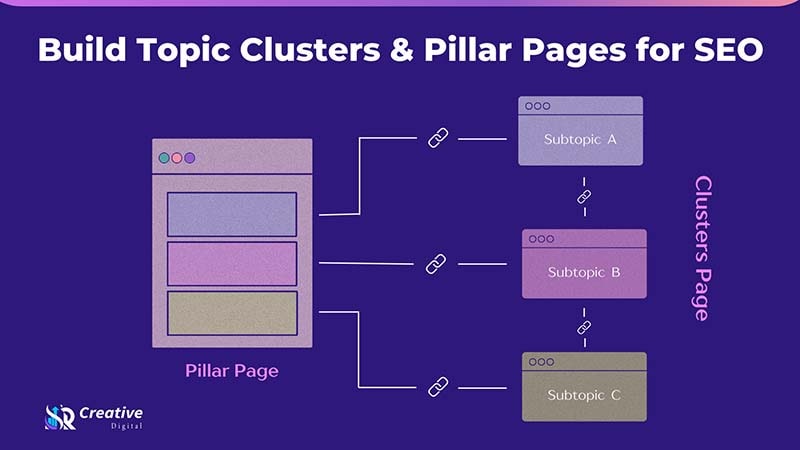
Topic clusters are groups of content pages on your website that are thematically related and revolve around one core topic. Each cluster usually consists of:
- A single “hub” or “pillar” page
- Several subpages (most likely blog posts or service pages) that discuss specific viewpoints or sub-topics
- An efficient internal linking structure between them
According to Conductor: “A group of pages related to a central topic can also be referred to as the hub and spoke content strategy.”
In short, think of the pillar page as the “trunk” of a tree and the cluster pages as the branches.
Pillar Pages
A pillar page (also called a “pillar post”) is the central content asset that provides a comprehensive overview of a broad topic. It touches on all major aspects of the topic, but doesn’t go into full depth on each one — instead, it links out to cluster pages for more detail.
According to HubSpot: “A pillar page covers all aspects of a topic on a single page, with room for more in-depth reporting in more detailed cluster blog posts that hyperlink back to the pillar page.”
“A pillar page includes detailed content on a specific topic and links to supporting topics. Collectively, this is called a topic cluster.”
2. Why They Matter for SEO (and What Google Is Looking For)
Using topic clusters and pillar pages is not only a “nice structure”, but there are several tangible SEO benefits:
Build Topical Authority
If you cover a topic in-depth — in a detailed manner (through cluster pages) and a general way (through the pillar page) — you indicate to search engines that your website is a source of reference for that particular subject.
An SEO expert on Reddit summarized it this way:
“Pillar pages remain a powerful SEO tactic … They act as a main hub for a broad topic, connecting to related, in-depth ‘cluster’ pieces. This set-up enhances user navigation and gives more clues to the search engines about the content hierarchy of your site.”
Improved Internal Linking & Crawlability
Rather than every page going after random keywords, you structure them by topic – the pillar page is aimed at the general keyword, cluster pages are aimed at long-tail or more specific subtopics. Thus, it becomes easier to diminish the instances of keyword cannibalization (a situation whereby several pages are vying for the same keyword).
Better User Experience (UX) & Engagement
Users are thus more likely to stay longer on the website, visit more pages, and interact with the content when they find a pillar page from which they can effortlessly move to a detailed cluster page – all these are positive SEO behavioral signals.
Long-Term Organic Growth
This content network, with its strong internal linking and comprehensive topical coverage, keeps pulling traffic, acquiring backlinks, and staying relevant- in other words, it is a sustainable SEO asset.
3. How to Plan Your Topic Cluster & Pillar Page Strategy
Here’s how you can start:
Step 1: Choose Your Core Topics
- Find out the “big buckets” of your business, niche, or audience.
- Pick topics that are: interesting to your target audience, consistent with your business objectives, and sufficiently extensive to accommodate several sub-topics but not excessively so that they become unmanageable.
Example: If you operate a digital marketing agency, a topic could be “Content Marketing Strategy.”
Step 2: Do Keyword & Topic Research
- Analyze the main themes to understand the user’s query.
- Identify sub-topics (cluster ideas) which users might be looking for (long-tail keywords) and are related to the main topic.
- Figure out the sub-topics that can be converted into cluster pages.
Step 3: Map Your Topic Cluster Structure
- Decide on a pillar page + a set of cluster pages for each core topic.
- Prepare a content diagram or table that shows the pillar page at the top, with arrows pointing to each cluster page.
- Be intentional with the anchor texts and internal links.
Step 4: Audit Existing Content (Optional but Recommended)
Take a look through your site to find articles that could either be directly used or modified to become part of the cluster.
Content that is not suitable or that causes overlap/competition should be updated, merged, or deleted
Step 5: Set Goals & KPIs
Decide what you want to achieve: e.g., more organic traffic, better rankings for certain keywords, improved user engagement, or increased conversions.
Determine metrics: e.g., ranking on the SERPs, number of page views, bounce rate, or internal link clicks.
4. Step-by-Step: Building a Pillar Page + Supporting Cluster Pages
Here’s a detailed “how-to” you can follow:
Building the Pillar Page
- Define the title & main keyword — e.g., “The Ultimate Guide to Content Marketing Strategy”.
- Create a strong outline that covers:
- What the topic is
- Why it matters
- Core components / key frameworks
- Common mistakes
- How to implement
- Further reading (clusters)
- What the topic is
- On-page SEO: The principal keyword is to be used in the URL, title tag, H1, and meta description. (HubSpot says: “A pillar page should perform on-page SEO best practices …. referencing the topic in the page title, URL, and H1 tag.”)
- Content depth & structure: This is a long-form page concept (generally 3,000-7,000+ words depending on the topic and the competition) with a breakdown of the different parts, table of contents, visuals, and anchor links.
- Internal linking from pillar to clusters: In a pillar page, you ought to link each cluster page (once they are available) by means of descriptive anchor text that reflects the sub-topic keyword.
Call-to-Action or conversion point: Place a CTA on the pillar page, for instance, a download, contact, or subscribe, to convert visitors into leads as the page is of high traffic.
Creating the Cluster Pages
- Create, for every sub-topic, a single page which is aimed at a certain long-tail keyword or a question (e.g., “How to build a content calendar for small teams”).
- Make sure that the content is profound, focused, and that it helps the user (not simply a copy of the pillar).
- On each cluster page:
- Return the link to the pillar page (anchor text = main topic keyword).
- Also, you may decide to link to other cluster pages if there are relevant (cross-linking).
- Work on SEO: title tag, URL, H1, meta description, and user intent alignment.
- Make a post and then update the pillar page to link to the new cluster page (and optionally show it as “new”).
Launch & Promotion
- The very first thing after you have made public your Pillar along with a few cluster pages, is to promote them: social media, email newsletter, and outreach for backlinks.
- Encourage internal traffic: linking to pillar and cluster pages from other related posts/pages.
- Keep an eye out for the early traffic, engagement, and changes in ranking.
5. Internal Linking, Site Structure & URL Considerations
Internal Linking Best Practices
- Pillar → Cluster: Link out to all cluster pages from the pillar page.
- Cluster → Pillar: Each cluster page should have a link back to the pillar page.
- If the sub-topics are closely related, you can also cross-link between the cluster pages as an option.
- Such a structure of “hub and spoke” type content network is understandable for search engines, that it is a strong signal of topic relevance.
- According to Google’s own guide, showing users other similar content that may be of their interest is part of a good UX.
URL & Site Structure Tips
- In case the URLs are used for different levels of the site, then they should be clear, explanatory, and indicate the hierarchy: for instance, /content-marketing-strategy/ for a pillar, /content-marketing-strategy/content-calendar/ for a cluster page.
- However, the URL structure is a little bit less of an issue than content relevance and linking. One SEO community comment reads:
“URL is such a weak signal for ranking anyway…”
- Make sure that the pillar page is available to be seen by a maximum number of people (e.g., top-level navigation, main category, etc.) so that it cannot only transfer link equity but also be easily found.
Site Structure & Taxonomy
Keep categories for topics that are understandable both to users and crawlers.
Do not generate orphan pages (cluster pages that are not linked from the pillar).
Make sure that your pillar pages and cluster pages are reachable by crawlers (not locally or behind login/forms) and indexed. HubSpot points out that there should not be content in pillar pages that is locked behind a form or password.
6. Common Mistakes to Avoid
- Choosing topics that are overly broad: For example, a pillar page such as “Everything about marketing” is excessively vague. You simply won’t be able to handle it adequately. HubSpot suggests that you choose something that is specific enough but still broad enough to be able to support clusters.
- Developing clusters that lack distinctive features: In case your cluster pages are too similar to each other or they target the same search intent, you will have issues of keyword cannibalization.
- Poor internal linking: The failure of the structure is when the pillar page does not link to clusters (or vice versa).
- Ignoring user intent: Content has to fulfill the actual needs of users, which means it should be based on user intent and not merely focus on keywords.
- Not changing/maintaining content fresh: Reliable main pages, for example, can lose their freshness over a certain period of time. Hence, they require constant checkups.
- Disregarding conversion possibilities: Because of the high number of visitors, pillar pages can be considered as valuable traffic sources – if you do not make the effort to convert the visitors, you’re leaving value on the table.
7. Measuring Success & Ongoing Maintenance
What to Track
- Organic traffic to the pillar page + cluster pages
- Keyword positions (primary for pillar, secondary/long-tail for cluster pages)
- Time on page, bounce rate, pages per session (for engagement)
- Internal link clicks from pillar to cluster pages
- Backlinks pointing to the pillar page (since this is the “authority hub”)
- Conversion rate (subscriptions, downloads, leads) via the pillar page
Maintenance Tasks
- Update pillar page: When you publish additional cluster pages, make sure to update the pillar page’s table of contents or links to reflect those.
- Monitor for content decay: It may happen that some cluster pages become outdated or irrelevant — therefore, update, merge, or redirect them accordingly.
- Expand cluster pages: In a long run, you may discover more sub-topics — hence decide to create new cluster pages and integrate them.
- Promote & build backlinks: Pillar pages are usually link-attracting — thus, keep strengthening authority via outreach, guest posts, mentions, etc.
- Re-audit internal links: Check that all cluster pages still have the correct links to the pillar, and there are no broken or inactive links.